

Roblox Assistant: How to Use the AI Helper in Roblox Studio
Open Roblox Assistant from the mezzanine bar in Studio and type a request. It builds objects, writes scripts and inserts assets. Commands, Plan mode, Skills.
Image: Emergency Response: Liberty County by Police Roleplay Community (Roblox)
On this page9
To use Roblox Assistant, open a place in Roblox Studio, click Assistant on the right side of the mezzanine bar at the top of the window, and type what you want in plain words. Assistant writes Luau and runs it on your place, so a request like “create a terrain region with rolling hills” shows up in the viewport a few seconds later. If you do not like the result, click the redo icon to regenerate, and use the thumbs up or down to rate it.
Roblox describes Assistant as an AI helper that answers questions, generates content and performs actions directly in Studio. Under the hood it combines a large language model with a run-command system that acts on the data model.
Quick facts
- Where
- Mezzanine bar, right side
- Also on
- The Roblox docs site
- Chats
- Several per place, saved in the cloud
- Own model
- Anthropic, OpenAI or Gemini key
- Price
- Not listed in the docs
What Assistant can do
From the Roblox guide, Assistant can:
- answer questions about Roblox development
- create and change objects and scripts
- search for and insert Creator Store assets
- explain code you have selected
- generate materials
- generate 3D meshes and procedural models
It can also look at your viewport. A screen capture subagent can see the scene in Edit and Play modes, which helps when you ask it to fix something that looks wrong.
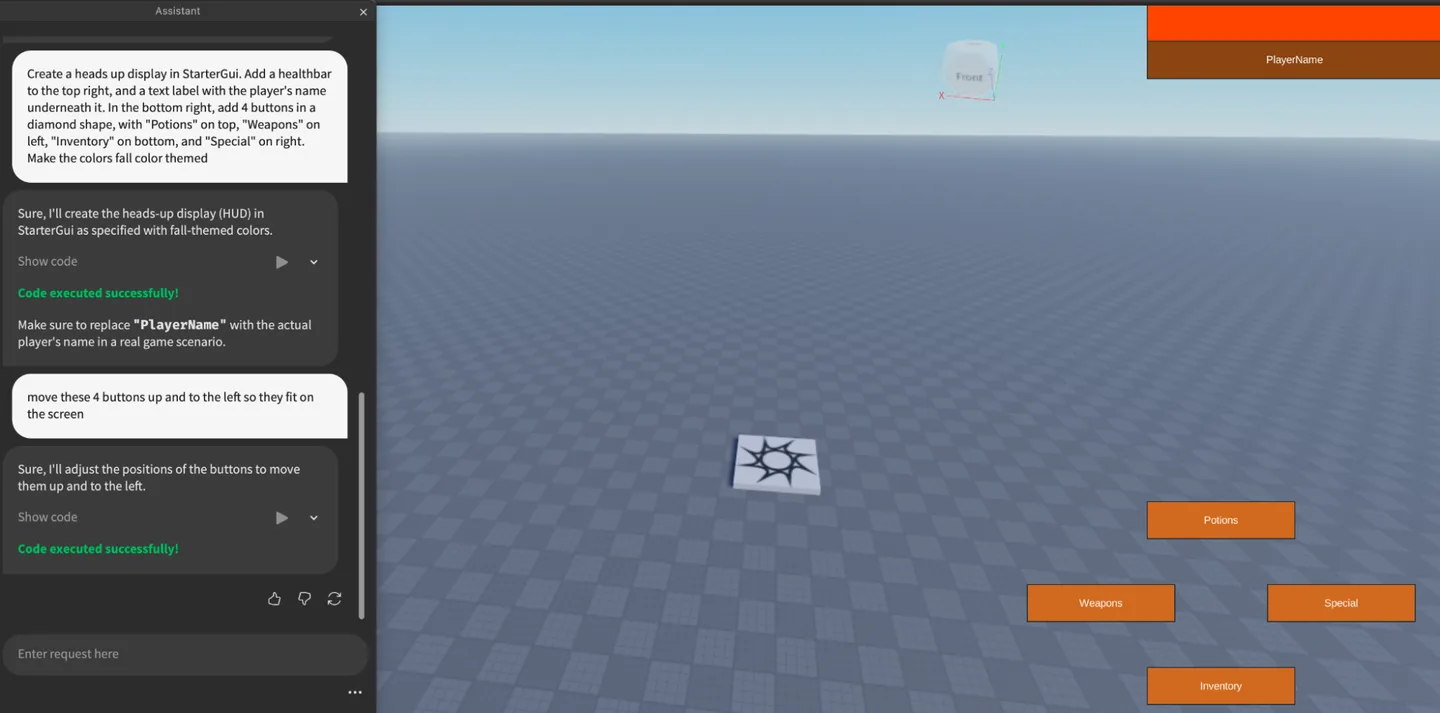
The example above from the Roblox docs shows the normal loop: one detailed prompt builds a HUD with a health bar, a name label and four buttons, then a short follow-up (“move these 4 buttons up and to the left”) fixes the layout. You rarely get it right in one message, and that is fine.
Your first session, step by step
- Open Roblox Studio and open or create a place (a Baseplate works).
- Click Assistant on the right side of the mezzanine bar.
- Type a request, for example: “Add a red part above the SpawnLocation that spins slowly.”
- Watch the viewport. Click Show code under the reply if you want to read the Luau it ran.
- Click the redo icon if the result is off, or type a follow-up that says exactly what to change.
- Save the place with File › Save when you are happy.
Chats and history
You can keep several chats per place. Click New Chat in the chat list to start one, or use the branch icon to spin a new chat off an existing one. History is saved in the cloud and scoped to the place, and Roblox says there is no hard limit on chats per place. Deleted chats cannot be recovered.
Slash commands
You can ask in plain words, but a few slash commands give you more control.
Assets
Asset search covers free and paid Creator Store assets plus your personal and group inventories. Types include Model, Audio, Mesh, MeshPart, Image, Decal, Video and Package. If you already know an asset ID, /insert_asset drops it straight in.
Meshes
/generate_mesh followed by a prompt makes a 3D mesh. The prompt can be text or an image, not both. Select a Part first and Assistant uses it as the bounding box. You can set a maximum triangle count, and the default is 10,000.
Procedural models and segmentation
/generate_procedural_model makes a procedural model. The limit is 50 per rolling 24-hour window, and output goes into a GeneratedFolder. Generated models can be split into up to eight named parts: enter the prompt, an optional hint image and part names, click Confirm, choose from four previews, click Confirm again, then Add to place. For a MeshPart you imported yourself, /segment_mesh splits it with up to five part names per run (Roblox calls this an early preview).
Planning Mode
For bigger jobs, switch to Plan in the dropdown or type /plan. Assistant writes a plan as Markdown first. Click Open Plan to edit it, Save your changes, and nothing runs until you click Build. This is the safer way to ask for something like “set up a round system with a lobby and a timer,” because you can cut steps you do not want before any code touches your place.
Skills
Skills are Markdown documents that tell Assistant how to handle a certain kind of task. Each one has frontmatter with name, description and enabled, and you manage them in the Skills tab. Names starting with rbx- are reserved for Roblox’s own skills. A short skill like this keeps your conventions in every chat:
-- Example of a convention you might put in a skill:
-- "Put server scripts in ServerScriptService, name RemoteEvents in PascalCase"
local ReplicatedStorage = game:GetService("ReplicatedStorage")
local scoreChanged = Instance.new("RemoteEvent")
scoreChanged.Name = "ScoreChanged"
scoreChanged.Parent = ReplicatedStorage
Using your own AI model
Assistant can run on your own API key. Click … in Assistant, choose Manage API Keys, pick Anthropic, OpenAI or Google Gemini, paste your key, then choose the model in the Model drop-down. Usage on your key is billed by that provider, not Roblox.
The same … menu holds Manage MCP Servers, where you can turn Studio into an MCP server so Claude Desktop, Claude Code, Cursor and other clients can work in your place from outside. That setup is covered in Roblox Studio MCP.
Limits and checking the output
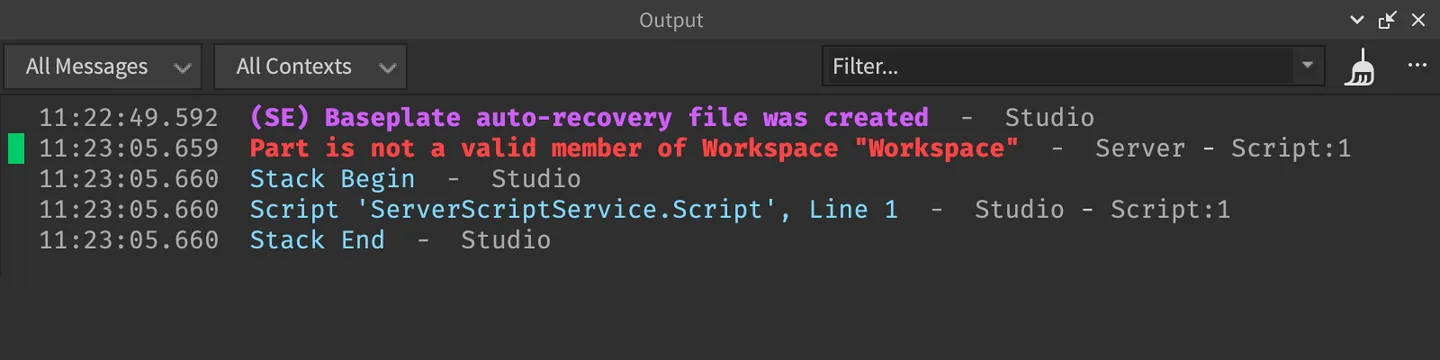
Roblox has not published a price for Assistant in the docs we read. The limits it does state are the 50 procedural models per 24 hours and the default 10,000 triangle cap on meshes. Like any AI, Assistant can write code that runs but does the wrong thing, so playtest after each change and keep the Output window open for errors.
Save often, and if you want history you can roll back, keep your scripts in Git through Script Sync or Rojo. For how Assistant fits with every other AI feature, read Roblox AI, and for a full project built this way, see how to make Roblox games with AI.
Roblox Assistant FAQ
Where is Assistant in Roblox Studio?
Click Assistant on the right side of the mezzanine bar at the top of Studio. It is also available inside the Roblox documentation site.
Is Roblox Assistant free?
The Roblox docs we read do not list a price for Assistant. They do list rate limits, such as 50 procedural models per rolling 24-hour window.
Can Roblox Assistant use Claude or GPT?
Yes. In Assistant, click ..., then Manage API Keys, add a key from Anthropic, OpenAI or Google Gemini, and pick the model in the Model drop-down.
Can I get back a deleted Assistant chat?
No. Roblox says deleted chats cannot be recovered. Chat history is saved in the cloud and scoped to the place you have open.
What is the difference between Assistant and Roblox Build?
Assistant runs inside Roblox Studio on desktop and edits your place. Roblox Build is a tab in the Roblox mobile app that makes whole 2D and 2.5D games from chat.
Keep building
Every guide, newest first How to Make a Roblox Game: The Full Process, With and Without AIInstall free Roblox Studio, start from a template, build, script, test, then publish from File › Publish. Every stage explained, plus where AI tools help.Beginners7 min read
 How to Make Roblox Games With AI, From Idea to Published GameMake a Roblox game with AI: plan with Claude, build in Studio with Assistant and MCP, make art in Higgsfield, then playtest and publish. Every step in order.AI Tools5 min read
 Roblox AI Game Maker: Every Way to Make a Roblox Game With AIThe real Roblox AI game makers: Build on mobile, Assistant in Studio, Studio MCP with Claude or Cursor, plus Higgsfield for art, video and fast prototypes.AI Tools4 min read
 Roblox AI: Every AI Feature in Roblox and Roblox StudioRoblox AI covers Assistant, Code Assist, mesh, material and texture generators, Avatar Setup, the Studio MCP server and Build. What each does and where it is.AI Tools5 min read
 The Best AI Tools for Roblox Creators (November 2026)The AI tools worth using for Roblox games: Roblox's built-in AI, Claude and Cursor for Luau, Meshy for 3D, Higgsfield for icons and video, ElevenLabs for audio.AI Tools3 min read
 How to Make a Roblox Game Step by Step: Your First Obby in One AfternoonA click-by-click beginner tutorial: install Roblox Studio, open Baseplate, build an obby, add a kill brick script, playtest with F5 and publish it privately.Beginners4 min read