

How to Animate in Roblox Studio: Animation Editor, Capture and AI
Open the Animation Editor from the Avatar tab, pose a rig on the timeline, set looping and priority, publish to Roblox, then play it with an Animator in Luau.
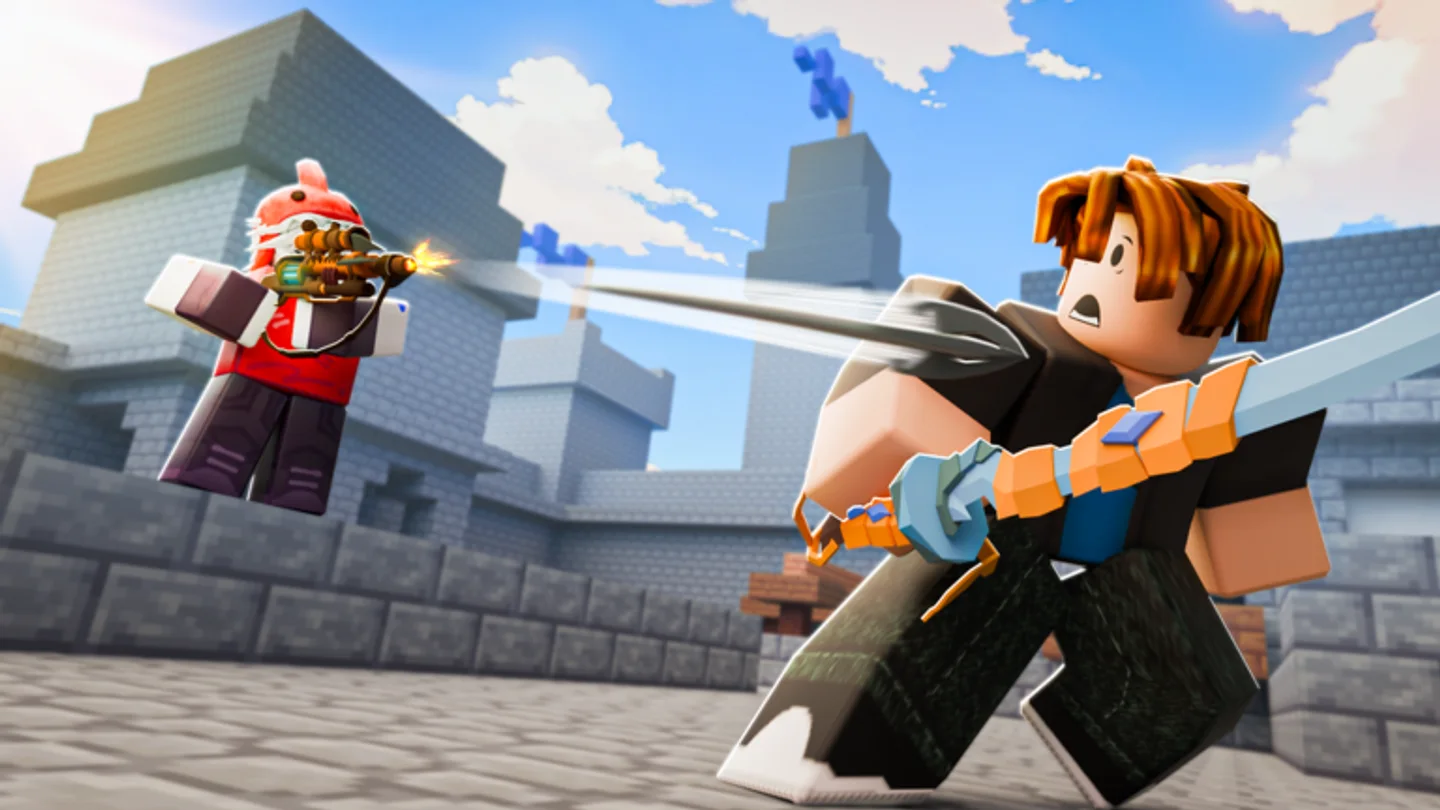
Image: BedWars by Easy.gg (Roblox)
On this page10
To animate in Roblox Studio, insert a rig, select it, open the Animation Editor from the Avatar tab, move the scrubber along the timeline and pose the rig’s parts to create keyframes, then press Play to preview. When it looks right, publish it with Publish to Roblox, copy the asset ID and play it from a script through the character’s Animator. If you would rather start from AI, Studio can generate an R15 animation from a text prompt or from a short video of yourself.
Quick facts
- Open
- Avatar tab or Window › Avatar
- Needs
- A rig
- Default frame rate
- 30 fps
- AI text-to-animation
- R15, up to 10 s
- Video capture
- Under 15 s, R15
Step 1: Get a rig
The Animation Editor only works on rigs: models made of parts connected by joints. If your place has no character model, use the Rig Generator (Rig Builder) on the Avatar tab to insert a pre-built one. Those rigs already have the parts and joints a character animation needs. For a custom rig with Motor6D joints, Roblox’s docs warn to check that the assembly root part is the one you want to stay still; setting PrimaryPart does not set it.
Select the rig in the viewport or Explorer, and the editor opens on it.
Step 2: Learn the editor
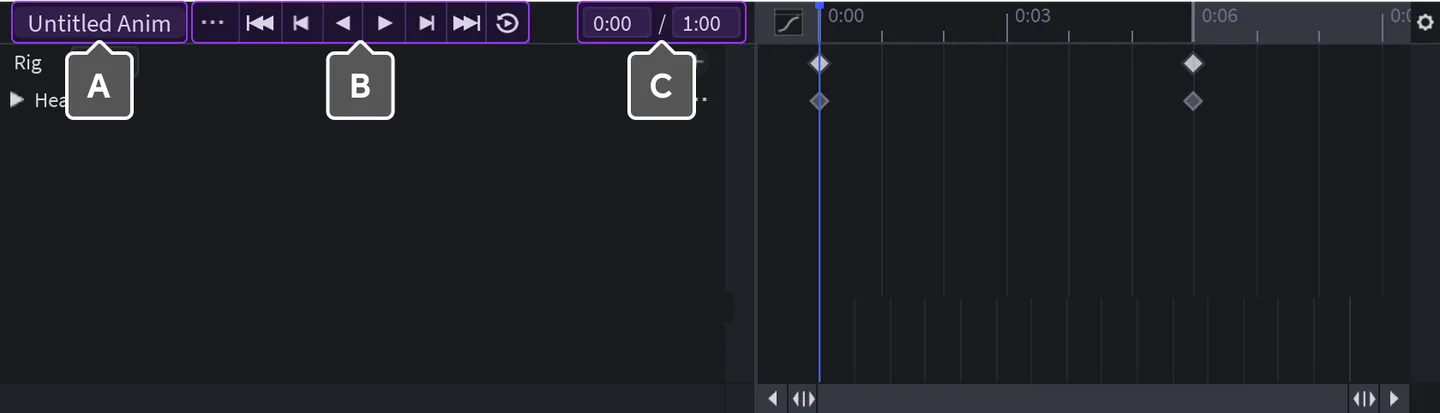
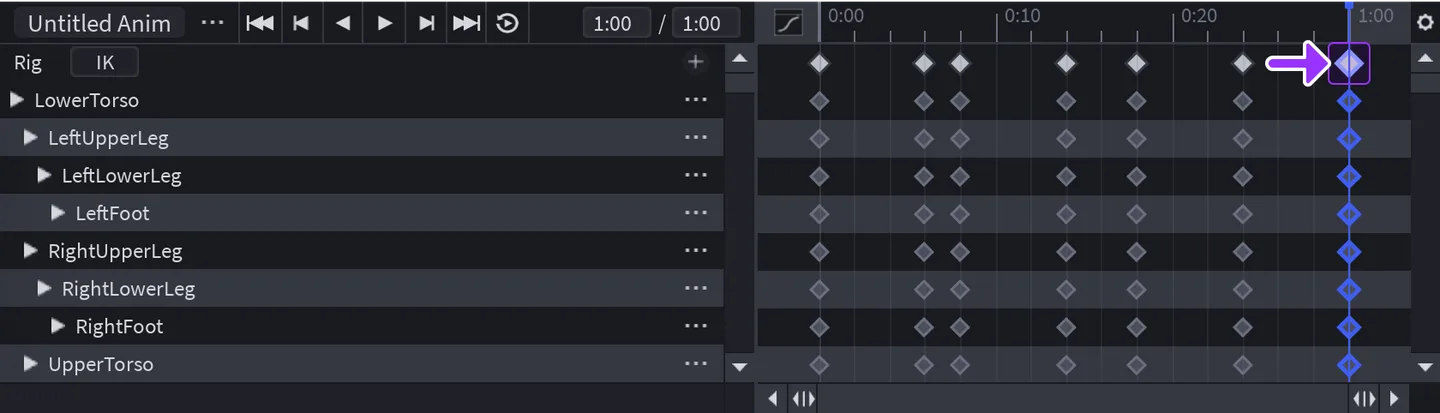
The Animation Editor docs split the window into three areas: playback controls at the top, a track list on the left and the timeline on the right. The position indicator shows where the scrubber sits in seconds:frames. A new animation is 1 second long; type a larger number in the right-side box of the position indicator to extend it.
Step 3: Create poses
An animation is a series of poses, and the editor fills in the motion between them.
- In the Explorer, expand the rig and select a part (or bone), such as the right arm.
- Drag the scrubber to the time for this pose. At 30 fps, 0:15 is half a second.
- Move or rotate the part. Press R to switch between Move and Rotate.
- A track for that part and a keyframe at that time appear automatically.
- Press Spacebar or the Play button to preview.
A simple wave needs three or four poses: arm down, arm up, hand tilted left, hand tilted right. Start with the big body motion, then add smaller parts like hands and head once the main movement reads well.
Step 4: Refine keyframes and easing
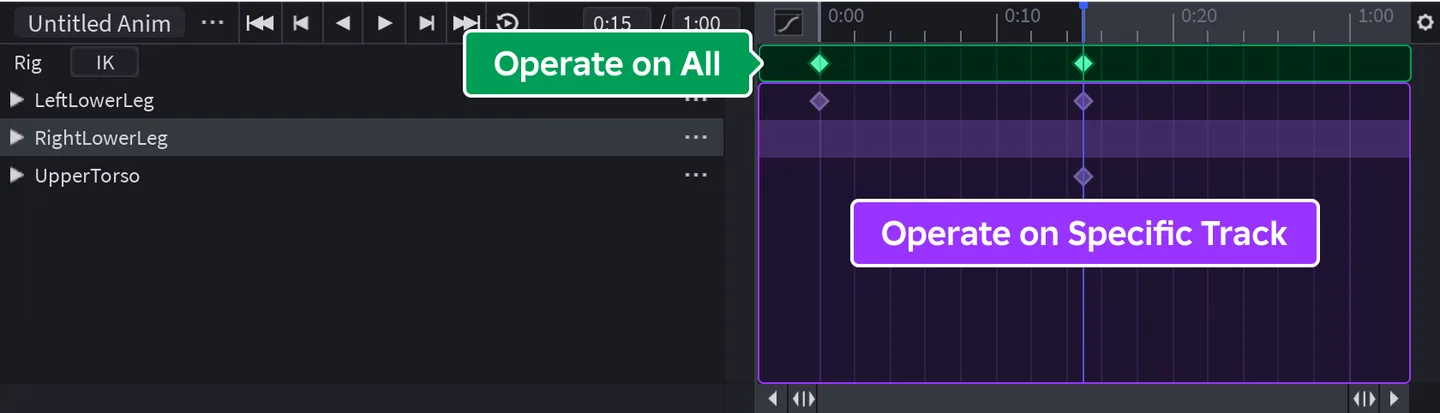
Right-click a track and choose Add Keyframe Here to insert one, drag keyframes to retime them, copy and paste with Ctrl+C and Ctrl+V (Cmd on Mac), and press Delete to remove them.
Easing makes the biggest difference to how natural motion looks. Right-click selected keyframes and choose an Easing Style: Linear (steady), Constant (snaps from pose to pose), CubicV2 (smooth ease), Elastic (rubber band) or Bounce. Then pick an Easing Direction such as In (slow start) or Out (slow finish). Roblox’s own example shows a head turn that looks robotic with linear easing and natural with cubic.
Step 5: Loop and set priority
For idles, walks and dances, click the Looping button in the playback controls. A loop does not blend the last pose back into the first, so copy your first keyframes to the end of the timeline to avoid a jump.
Priority decides which animation wins when two play at once. Click the … button, hover over Set Animation Priority and choose a level. Roblox has seven, including Action4 at the top, then Action3, Action2, Action, Movement and Idle. A jump animation should outrank an idle so the character does not do both.
Step 6: Save, then publish
Save (under the … menu) stores your work as a KeyframeSequence in ServerStorage. That keeps your progress but does not make the animation usable in a live game. To use it:
- If it replaces a default animation like running or jumping, rename the final keyframe to
Endand save. - Click … and choose Publish to Roblox.
- In Asset Configuration, enter a title and optional description. Pick a group in Creator if the game is group-owned.
- Click Submit, then copy the animation’s asset ID from the Toolbox.
Step 7: Play it from a script
A character’s Humanoid needs an Animator. Animator:LoadAnimation() returns an AnimationTrack you can play:
local Players = game:GetService("Players")

Players.PlayerAdded:Connect(function(player)
	player.CharacterAdded:Connect(function(character)
		local animator = character:WaitForChild("Humanoid"):WaitForChild("Animator")
		local anim = Instance.new("Animation")
		anim.AnimationId = "rbxassetid://0000000000" -- your asset ID
		local track = animator:LoadAnimation(anim)
		track:Play()
	end)
end)
Replace the zeros with your ID. New to scripts? Read how to script in Roblox first.
Blend clips with Animation Graph state machines
Once you have several clips, an Animation Graph can control how the character moves between them. Roblox moved state machines and Luau expressions in these graphs to full release on November 19, 2026. The announcement says they work in live games and with Server Authority, and that graphs made during the beta keep working.
To add one, right-click the canvas in the Animation Graph Editor and choose Insert Node › State Machine. Each transition has a Wait For setting (an expression or the current state finishing), a length, a curve and a priority that must be unique within the machine. There are also two special states, Entry and Any.
For an expression, drag a wire from a property pin and choose Expression. Your script changes graph values with SetParameter() on the animation track. Expressions read only those parameters, so they cannot look at the character or the workspace. They allow the math library but no loops, functions, tables, require() or method calls. State machines do not replace Humanoid states. Other changes from that week are in the November Studio update notes.
Faster routes: capture and AI
Animation Capture
Studio can record motion for you. Body capture takes an .mp4 or .mov clip of a single continuous shot under 15 seconds from a stable camera and turns it into keyframes on an R15 rig in about a minute. Face capture uses your webcam to puppet an animation-compatible head for up to 60 seconds; it needs the Face Capture beta and appears as a Face Capture button in the track list. Details are on Roblox’s capture page.
Text to animation with Studio MCP
Roblox Studio’s built-in MCP server includes a generate_animation tool that makes R15 animations from a text description (or converts R6 to R15), up to 10 seconds long. Connect Claude Code, Claude Desktop or Cursor as described in our Roblox Studio MCP guide, select your rig, and ask for something like “a 3 second excited victory jump with arms up”. Then open the result in the Animation Editor to fix timing and easing by hand.
Claude
CodeCalls Studio's generate_animation MCP tool from a chat, then helps wire the animation into your scripts.
- Free tier
- Pro $20/mo (checked Nov 2026)
Outside Studio, video-to-motion tools like Rokoko Vision and Plask export FBX files you can bring in through the 3D importer. Our best AI tools for Roblox roundup compares them.
For where animation fits among all the other parts of a game, see the how to make a Roblox game hub.
Roblox Animation FAQ
Where is the Animation Editor in Roblox Studio?
On the Avatar tab, or under Window › Avatar. It only works on a rig, so insert one with the Rig Builder first if your place has none.
What frame rate do Roblox animations use?
By default the Animation Editor runs at 30 frames per second and shows time as seconds:frames, so 0:15 is half a second. You can change the frame rate in the editor's settings menu.
Can AI make Roblox animations?
Yes. Studio's built-in MCP server has a generate_animation tool that creates R15 animations from text, up to 10 seconds long, which Claude or Cursor can call. Studio also has Animation Capture for body motion from video and face motion from a webcam.
Why does my animation not play in game?
Saving only stores it in ServerStorage. Publish it with Publish to Roblox, copy its asset ID, and load it through the Humanoid's Animator in a script.
How do I make an animation loop smoothly?
Click the Looping button in the playback controls, and copy the first keyframes to the end of the timeline, because a loop does not blend the last keyframe back into the first.
Do Roblox Animation Graphs have state machines?
Yes. State machines and Luau expressions reached full release on November 19, 2026, and work in live games.
Keep building
Every guide, newest first How to Make an "In This Town" Roblox VideoMake an In This Town Roblox Short: pick a strange town rule, script the escalation, build the town in Studio, voice it, caption it and end on a comment hook.YouTube and Shorts5 min read
 How to Make Viral Roblox Animations: Story Videos and ShortsMake Roblox animation story videos and Shorts: animate in Studio or Moon Animator, record, add AI voices, edit, then hook, caption and loop for YouTube.YouTube and Shorts6 min read
 The Best AI 3D Model Generators for Roblox StudioWhich AI 3D model generators work for Roblox: Roblox's own mesh generation, Meshy, Rodin, Scenario and Tripo, compared on export formats, free tiers and price.Assets and Models3 min read
 Blender to Roblox: Export Settings and Import StepsMove models from Blender into Roblox Studio: official FBX export settings, 3D Importer steps, triangle and texture limits, and Roblox's Blender plugin.Assets and Models4 min read
 How to Make a Map in Roblox Studio (Terrain, Heightmaps and AI)Make a map in Roblox Studio with the Terrain Editor: Generate, heightmap Import, sculpt and paint tools, plus how Assistant and the Studio MCP help fill it in.Building and Maps4 min read
 Meshy AI to Roblox: Generate a 3D Model and Import It Into StudioMake a model in Meshy, export FBX or GLB, keep it under 20,000 triangles, and bring it into Roblox Studio with the 3D Importer. Settings, textures and fixes.Assets and Models4 min read