Make a Game With Higgsfield Games and Claude Over MCP, Then Bring the Assets to Roblox
Connect Claude to the Higgsfield MCP to prototype a game idea and generate art fast, then move images, textures and video into Roblox Studio. What runs where.
Image: Emergency Response: Liberty County by Police Roleplay Community (Roblox)
On this page7
The fastest way to find out whether a game idea is fun, and to get art for it at the same time, is to connect Claude to Higgsfield’s MCP server, describe the game, and let Higgsfield Games build a playable browser version while Claude handles the logic and Higgsfield generates the assets. Once the idea holds up, you take the images, textures and video into Roblox Studio and build the real Roblox game there. Be clear on one point from the start: the Higgsfield game runs on Higgsfield’s hosting in a web browser. It is not a Roblox experience and does not export to Studio.
Higgsfield AI
Images and videoBuilds a playable web prototype from a prompt and makes the icons, textures and trailer video you can reuse in Roblox.
- Free tier
- Paid plans from $19/mo (checked Nov 2026)
Affiliate link: we may earn a commission if you subscribe, at no extra cost to you. How this works.
Quick facts
- Output
- Browser game on a Higgsfield link
- Runs on Roblox?
- No
- MCP URL
- https://mcp.higgsfield.ai/mcp
- Needs
- Paid Higgsfield plan, MCP client such as Claude
- Typical game cost
- About 70 credits ($3.50), per Higgsfield, Nov 2026
- 3D model export
- Not offered per Higgsfield pages read
What Higgsfield Games actually makes
Higgsfield says you describe a game in plain words and its Supercomputer agent “plans it, writes the code and logic, generates the assets, and deploys the result automatically.” You get a working, playable build with a link to share. The assets it generates into the game include characters, textures, sound, 2D art and 3D buildings. If you code, you can open the generated project and edit it directly. There is a multiplayer toggle with lobbies and state sync included.
Deploying gives you a private link. Publishing is a separate, optional step that lists the game in the Higgsfield Games marketplace, where people can find, play and remix it.
You can start a game from Supercomputer on the web, from the ChatGPT plugin, or through the MCP. This page covers the MCP route with Claude.
Why prototype outside Roblox first
A Roblox game takes real work in Studio: parts, scripts, UI, testing. Before you spend that time, it helps to know whether the core loop is fun. A browser prototype you can send to friends in an afternoon answers that cheaply. It also leaves you with a folder of generated art (character concepts, a logo, background images, a short gameplay-style clip) that you can reuse for your Roblox icon, thumbnails and trailer.
Roblox has its own AI option for quick games, Roblox Build, which does publish to Roblox but is limited to 2D and 2.5D and is still rolling out by region. We compare the two in Roblox Build vs Higgsfield Games.
Connect Claude to the Higgsfield MCP
You need an active paid Higgsfield subscription. There is no API key; you sign in to your Higgsfield account in an authorize window. These steps are from Higgsfield’s help center.
Claude (web or desktop)
- Open Claude Settings and go to Connectors.
- Choose Add custom connector.
- Name it Higgsfield and paste
https://mcp.higgsfield.ai/mcp. - Click Connect and sign in to Higgsfield.
Claude Code and other command-line agents
Higgsfield gives these commands:
npm i -g @higgsfield/cli
higgsfield auth login
npx skills add higgsfield-ai/skills
Cursor and ChatGPT
In Cursor, open Customize, then Marketplace, find Higgsfield, click Add and sign in. In ChatGPT, add the Higgsfield plugin from the Plugins Directory or from higgsfield.ai/mcp.
The workflow: prototype, then assets, then Roblox
- Write a one-paragraph pitch: genre, what the player does every few seconds, how they win or lose, and the art style.
- Ask Claude, with the Higgsfield connector on, to build a playable prototype from that pitch and give you the link.
- Play it and send the link to a few friends. Ask Claude for one change at a time: speed, difficulty, scoring.
- When the loop feels right, write down the rules that worked. This becomes your design for the Roblox version.
- Ask Claude to generate the art you will reuse: a square game icon, wide thumbnail images, tileable surface textures, character concept sheets and a short promo clip.
- Collect the files from your Assets at higgsfield.ai. Higgsfield says every generation from a connected agent lands there, tagged with the MCP source, usually within 60 seconds of the job finishing.
- Build the game in Roblox Studio, using the prototype as your reference and the art as your starting assets.
Bringing Higgsfield assets into Roblox Studio
Higgsfield makes images and video, so those are the files you carry over. Its pages do not list a download format for the 3D buildings inside a game, so treat in-game 3D as staying on Higgsfield.
Images and textures
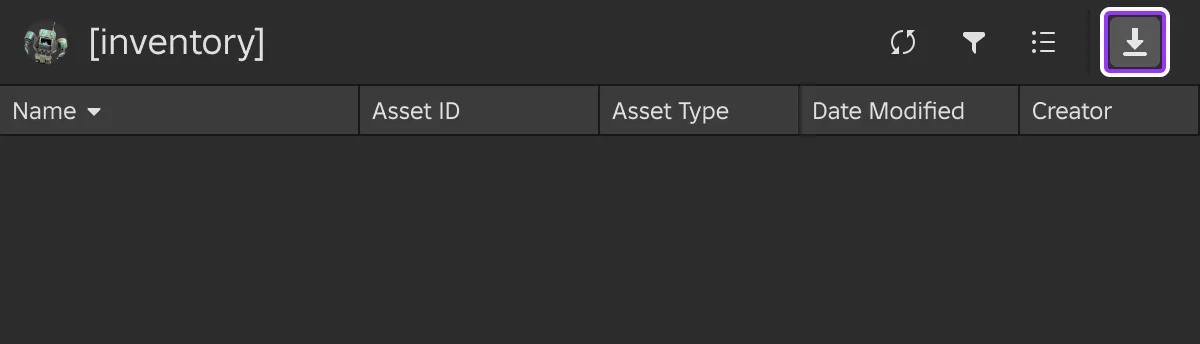
Import images through the Asset Manager. Its Import button handles bulk uploads. You can then use an image as a Decal (one face of a part), a Texture (tiled across a face), a UI image, or a ColorMap inside a SurfaceAppearance. Roblox’s texture specifications cap texture resolution at 1024x1024, so resize large images first.
If you want real tiling materials or textures made to fit a mesh, Roblox’s own Material Generator and Texture Generator in Studio may be a better match than flat AI images. The best AI tools for Roblox roundup covers both.
Icon and thumbnails
The strongest use of Higgsfield images is your game page. Generate a square icon and 16:9 thumbnails, then upload them when you publish. Roblox’s thumbnail guidance favors high resolution, a clear subject and the 16:9 shape. See our Roblox game icon guide for sizes.

Video
Higgsfield video models and Shorts Studio suit trailers and promo Shorts for YouTube, TikTok and other social feeds. Roblox’s thumbnail tools live in the Creator Dashboard; check Roblox’s current thumbnail docs for what media types the game page accepts before you plan around video there.
3D models
For meshes, use a 3D generator that exports .fbx, .obj or .gltf, which is what Studio’s 3D Importer accepts. Our Meshy to Roblox guide walks through one.
Using both MCP servers at once
Roblox Studio has a built-in MCP server too. With Studio’s server and Higgsfield’s connector both connected to the same client, Claude can generate an image on Higgsfield and work on your place in Studio in the same chat. Studio’s MCP tools include upload_image and store_image, but Roblox’s docs do not describe passing files directly from another MCP server, so you may still need to save the image locally and upload it. Setup for the Studio side is in our Roblox Studio MCP guide.
Higgsfield Games and MCP FAQ
Do Higgsfield Games run on Roblox?
No. A Higgsfield game is a separate web game hosted by Higgsfield at a shareable link. None of Higgsfield's pages mention Roblox export or Studio. You use it to test an idea and make art, then build the real game in Roblox Studio.
What is the Higgsfield MCP server URL?
It is https://mcp.higgsfield.ai/mcp. You sign in with your Higgsfield account instead of using an API key, and it needs an active paid subscription.
Can Higgsfield make 3D models for Roblox?
Not as files you can import. Higgsfield makes images and video, and no page we read lists a 3D model export. For meshes, see the AI 3D model generators for Roblox.
How much does a Higgsfield game cost to make?
Higgsfield's blog says a game starts at around 70 credits ($3.50) on average, taken from your plan credits per stage, as of November 2026. MCP use always spends credits.
Can I use the Roblox Studio MCP and the Higgsfield MCP together?
Yes, an MCP client such as Claude can have several servers connected. See Roblox Studio MCP setup for the Studio side.
Keep building
Every guide, newest first The Best AI Tools for Roblox Creators (November 2026)The AI tools worth using for Roblox games: Roblox's built-in AI, Claude and Cursor for Luau, Meshy for 3D, Higgsfield for icons and video, ElevenLabs for audio.AI Tools3 min read
 Roblox AI: Every AI Feature in Roblox and Roblox StudioRoblox AI covers Assistant, Code Assist, mesh, material and texture generators, Avatar Setup, the Studio MCP server and Build. What each does and where it is.AI Tools5 min read
 Roblox Build vs Higgsfield Games: Which AI Game Maker Should You Use?Roblox Build publishes simple 2D games to Roblox from your phone. Higgsfield Games builds web prototypes with art. Where each runs, cost, limits, which to use.Tools and Reviews3 min read
 Roblox Studio MCP: Connect Claude, Claude Code or Cursor to StudioTurn on Roblox Studio's built-in MCP server in Assistant, then connect Claude Desktop, Claude Code or Cursor. Config for Windows and Mac, tools, Higgsfield.AI Tools5 min read
 Roblox Build: How to Make a Roblox Game With AI on Your PhoneRoblox Build turns a typed idea into a playable 2D or 2.5D Roblox game in the mobile app. How it works, prompts, credits, publishing, limits and who can use it.AI Tools6 min read
 How to Make Roblox Games With AI, From Idea to Published GameMake a Roblox game with AI: plan with Claude, build in Studio with Assistant and MCP, make art in Higgsfield, then playtest and publish. Every step in order.AI Tools5 min read